
The active Kamatera coupon gives you a full 30 days free cloud VPS hosting with server credit worth up to $100.
That is a straight 100% discount for your first month. No promo code to paste, no minimum spend, no annual lock-in.
For a trader, that month is the cheapest way to answer one question. Does your MT5 terminal, NinjaTrader chart stack or Python bot actually hold up on a cloud server?
Kamatera servers start at $4 per month after the free period. Bigger builds sit at $25 and $39 per month, and you can shape the box yourself with any CPU, RAM and NVMe combination you like.
Below is the full breakdown. Live 2026 pricing, the exact dollars this Kamatera promo saves you, latency notes from a trader seat, and every step to redeem it.

Kamatera Deal Snapshot: The Numbers Worth Knowing
Here is the whole Kamatera discount in one glance, pulled from the official pricing and trial pages.
| Item | Detail |
|---|---|
| Best live offer | 30 days free, up to $100 credit |
| Entry plan | Basic at $4/mo, 1 vCPU, 1 GB RAM, 20 GB NVMe |
| Mid plan | Standard at $25/mo, 2 vCPU, 2 GB RAM |
| Upper plan | Pro at $39/mo, 2 vCPU, 4 GB RAM |
| Uptime guarantee | 99.95% |
| Data centres | 21 locations across 13 countries |
| Contract | None. Scale up or down whenever |
Kamatera bills monthly or hourly. Hourly servers are metered by the minute, which suits anyone who only needs a box during London or New York hours.
What the Free Month Actually Hands You
Plenty of hosts wave a free trial around and then hobble it. Kamatera does not do that.
Your Kamatera free trial voucher covers one cloud server valued up to $100 with the configuration of your choice. You pick the CPU type, RAM, disk and location.
Included in the 30 days:
That last pair matters more than traders expect. A specialist call on day one saves hours of fiddling with Windows firewall rules before your first chart even loads.
You do need a valid card to open the account. Nothing is charged during the trial period.
Kamatera Pricing 2026: Real Cost Once the Free Month Ends
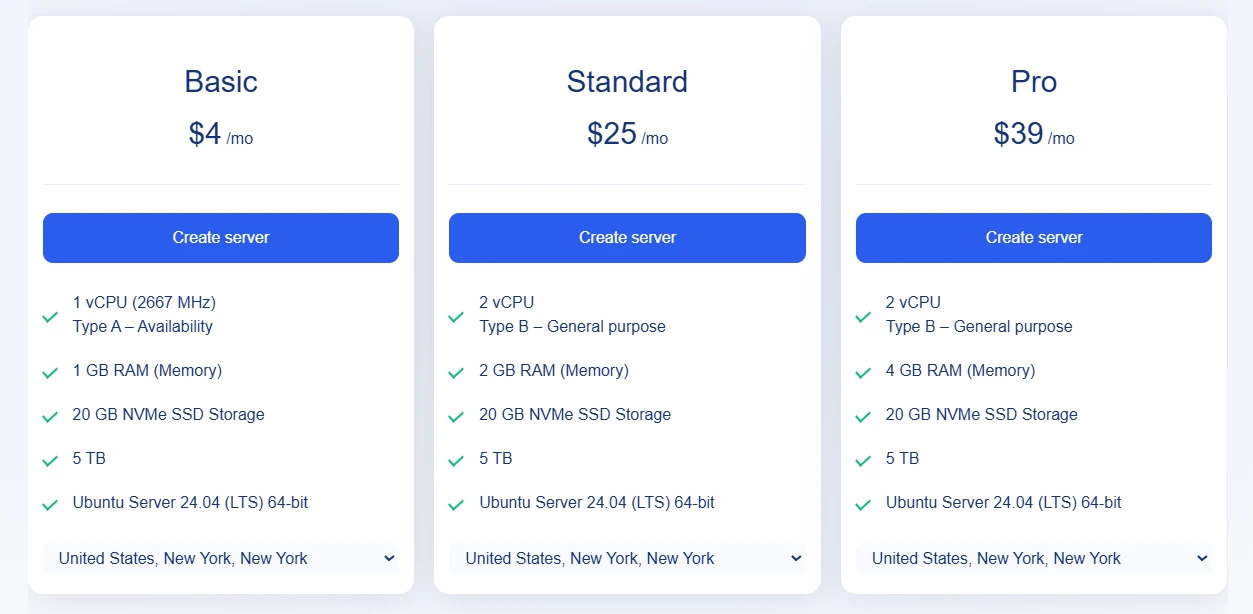
Kamatera publishes three recommended builds plus a calculator for custom specs. These are the current rates.
| Plan | Monthly | Specs | Year 1 with coupon |
|---|---|---|---|
| Basic | $4 | 1 vCPU, 1 GB RAM, 20 GB NVMe, 5 TB traffic | $44 (save $4) |
| Standard | $25 | 2 vCPU, 2 GB RAM, 20 GB NVMe, 5 TB traffic | $275 (save $25) |
| Pro | $39 | 2 vCPU, 4 GB RAM, 20 GB NVMe, 5 TB traffic | $429 (save $39) |
| Sample custom build | $10 | Type B core, 512 MB RAM, 5 GB disk, 5 TB traffic | $110 (save $10) |
Every figure above assumes you keep the same box for twelve months and pay for eleven of them. The free month is a straight 8.33% saving on year one.
Add-on rates are equally plain. Extra traffic runs at $0.01 per GB and extra storage at $0.05 per GB per month.
Hourly pricing exists too. The $10 sample build above works out at $0.014 per hour if you only power it on during your session.
Live Kamatera Coupons and Promo Offers This Month
Five different ways to pull value out of the same account. Each one targets a different kind of trading setup.
|
|

How to Claim the Kamatera Coupon?
Five minutes start to finish. No code to hunt down.
- Step 1: Open the discounted sign up page
Hit any activation button on this page. The 30 day offer attaches to your account automatically once you land on the Kamatera trial form.
- Step 2: Create your free account
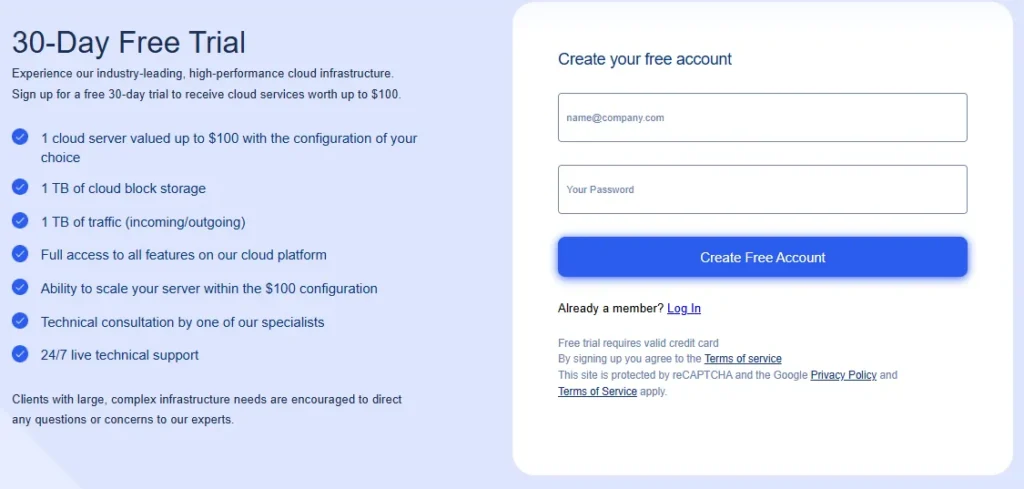
Enter an email and a password with one lowercase letter, one capital, one number and at least eight characters. Confirm the verification email that follows.
- Step 3: Add billing details
Fill in name, address, city, country, ZIP and phone in the billing profile section of the console. A valid card is required, though nothing is charged during the free period.
- Step 4: Confirm the offer is attached
Check the promo section of the billing screen before you finish. It should show 30 days free usage, one cloud server up to $100, plus the storage and traffic allowance.
- Step 5: Build the server
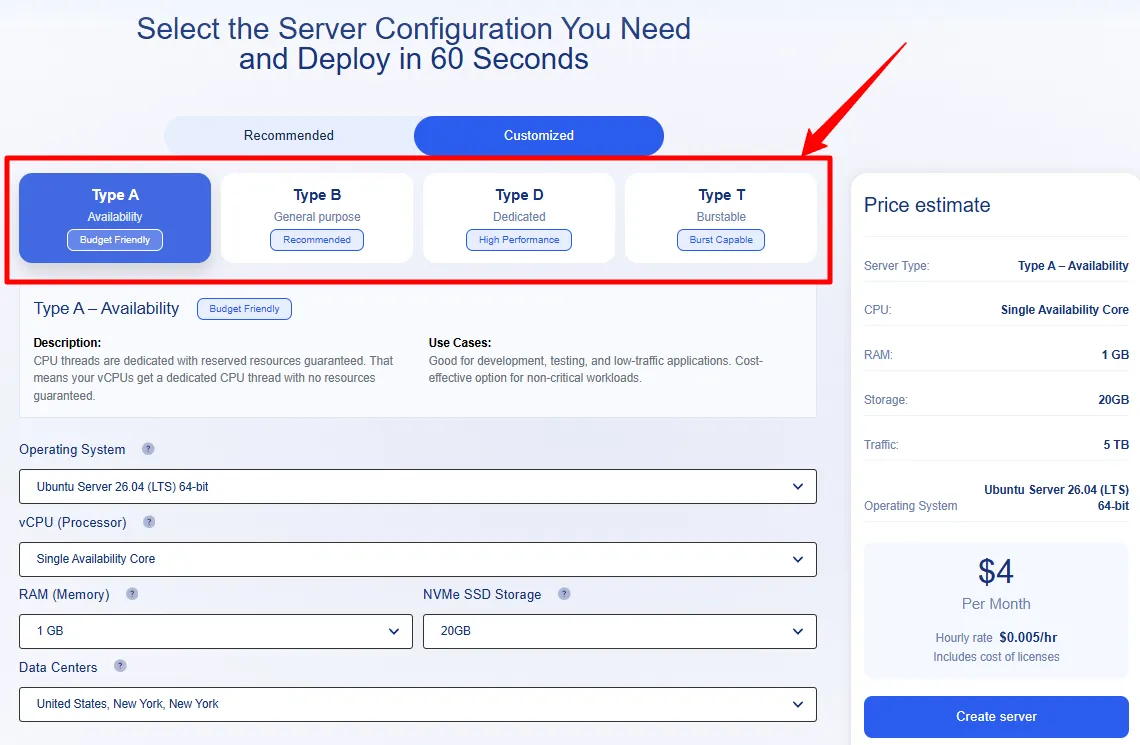
Choose server type, vCPU count, RAM, NVMe size, data centre and operating system. Windows Server 2025 or Windows Desktop 11 for MetaTrader, Ubuntu 24.04 for Python stacks.
- Step 6: Deploy and connect
Click create. Sixty seconds later you have RDP or SSH credentials. Install your platform, log into your broker and let it sit for a week before you judge it.
Server Types A, B, D and T Decoded for Trading Loads
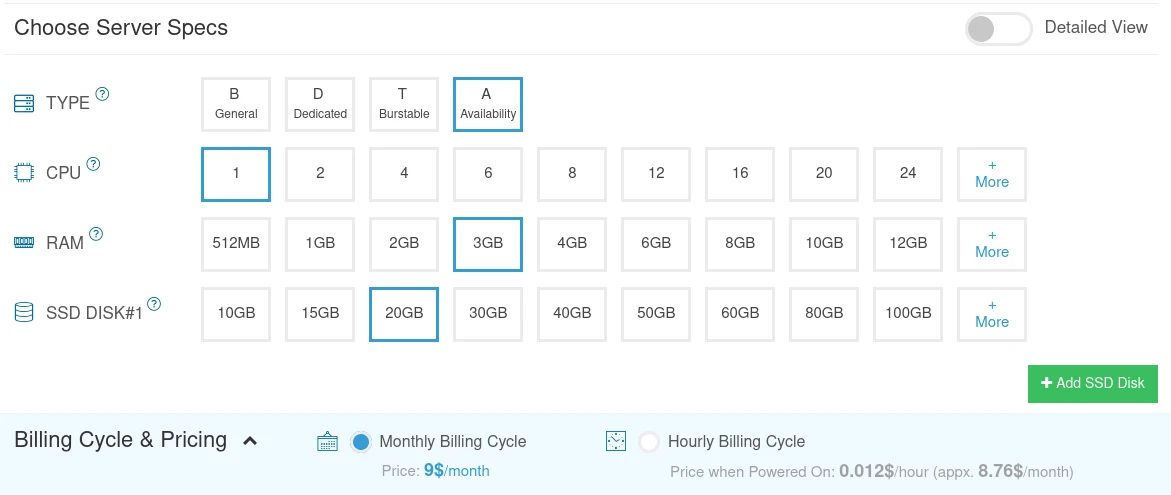
This is the part most reviews skip, and it is the part that decides your fill quality.
Kamatera sells four CPU classes. Pick wrong and your chart stack stutters at the worst possible moment.
Type A (Availability) is the budget tier. Fine for a price alert bot or a Telegram signal relay. Not where I would park a live scalping EA.
Type B (General purpose) is the sensible default. CPU threads are dedicated with reserved resources guaranteed, so you get fewer fluctuations under load. Good for standard production duties.
Type D (Dedicated) is the high performance class. If you push several MT5 instances plus a Python data feed, this is the tier to trial.
Type T (Burstable) handles spiky demand. Useful for a backtest machine that idles most of the week then hammers the CPU on Sunday.

Kamatera Features That Earn Their Keep on a Trading Desk
Feature lists bore me, so here are only the ones that change something for a trader.
Deploy in 60 Seconds
Server creation is near instant. Blew up your Windows install at 2am? Rebuild and be back on charts before the next candle closes.
Windows Desktop and Cloud Desktop Options
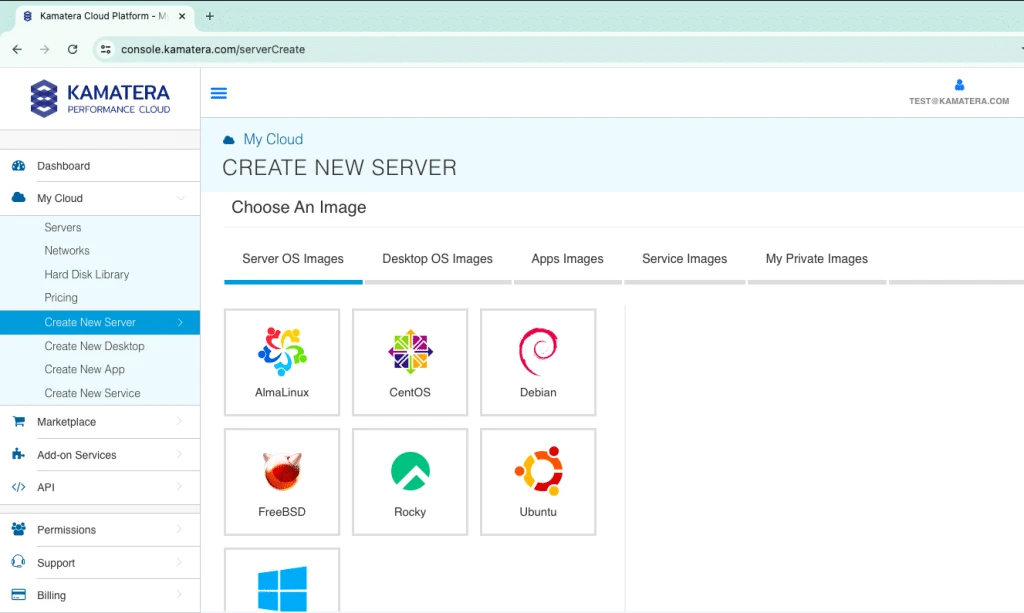
Beyond Windows Server, you can install Windows Desktop 11 or 10 and reach it over RDP. That gives you a proper remote trading terminal rather than a bare server shell.
Microsoft Remote Desktop per user licensing and Microsoft Office Standard are both available as OS add-ons at checkout.
Diagonal Scaling Mid Month
Add RAM or cores when your strategy count grows, then drop back down when you retire one. You prepay the config you chose, plus a prorated amount for later upgrades.
Cloud Firewall and Load Balancers
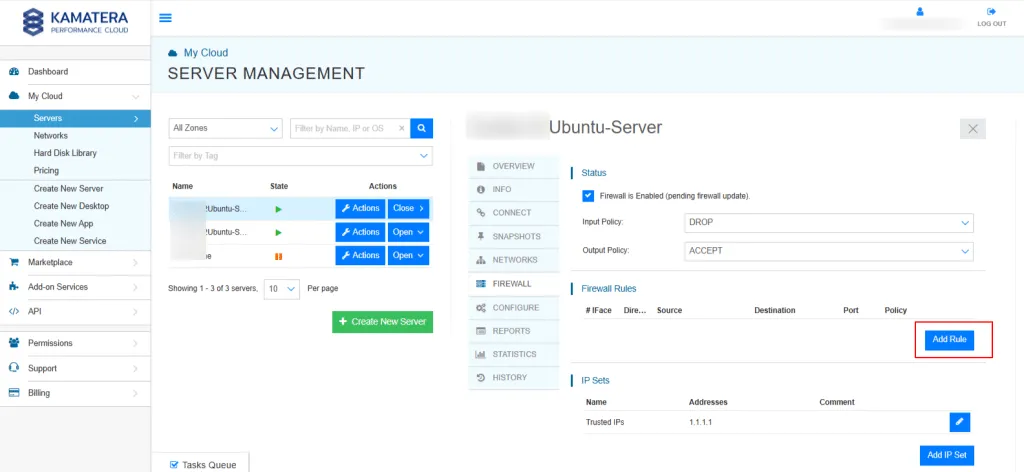
Lock RDP down to your home IP with the built in firewall. Load balancers matter if you split feed handlers from execution nodes.
Extended Daily Backup
Tick your backup box and the whole disk copies to a separate storage array each day. Restoring a single corrupted config file beats rebuilding a strategy from memory.
Cloud API for Automation
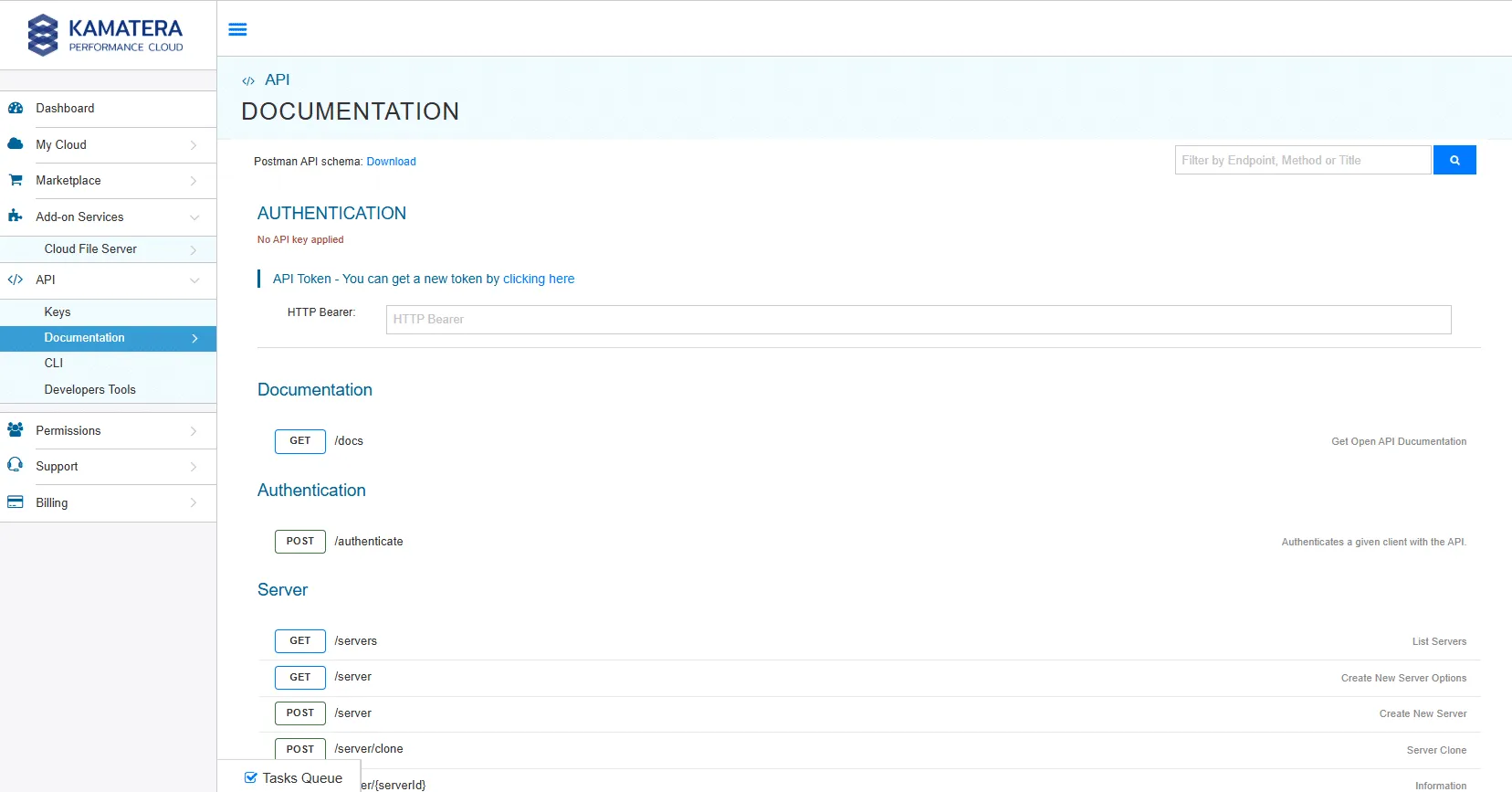
Quant desks can script deployments. Spin up ten identical backtest nodes, crunch the batch, tear them down and pay only for the minutes used.
Unmetered 50 Mbit Traffic Package
The popular package covers 5000 GB per month with no speed cap. Kamatera notes roughly 90% of clients stay under 2000 GB, so most traders never touch the ceiling.
Picking a Data Centre by Where Your Broker Sits
Kamatera lists 21 server locations. Choosing badly adds tens of milliseconds for no reason at all.
Rough guidance from a trader seat:
The free month is the honest way to settle this. Deploy, ping your broker, note the round trip, then rebuild elsewhere if the number disappoints.
Kamatera does not publish sub millisecond exchange proximity claims like the specialist trading hosts do. It is general purpose cloud with strong geography, which suits swing, position and semi automated traders far more than latency arbitrage.
Kamatera vs QuantVPS vs Hostinger VPS on Price and Fit
Three very different animals. Here is the honest split.
| Provider | Entry price | Free trial | Best suited to |
|---|---|---|---|
| Kamatera | $4/mo, no contract | 30 days, $100 credit | Custom builds, multi region, budget control |
| QuantVPS | From $59.99/mo | None advertised | Sub millisecond CME and NY4 execution |
| Hostinger VPS | From $6.49/mo on 24 months | None, 30 day refund window | Cheap Linux boxes, longer term lock in |
QuantVPS is purpose built for latency sensitive futures work, and it charges accordingly. Twelve months of its entry plan comes to $719.88.
Twelve months of the Kamatera Pro build sits at $468, and $429 once the free month lands. That is a gap of roughly $251.88 per year at list prices before the coupon even applies.
Hostinger undercuts both on headline price, but that $6.49 rate needs a 24 month commitment paid upfront. Kamatera asks for nothing beyond the current month.
My read: if you scalp futures for a living, pay for proximity. If you swing trade, run EAs overnight or need a stable remote desktop, Kamatera wins on flexibility and the trial removes all the risk.
Exact Savings Maths on This Kamatera Promo
No vague percentages. Here is what the free month puts back in your account.
| Build | 12 months at list | With free month | You keep |
|---|---|---|---|
| Basic $4/mo | $48 | $44 | $4 |
| Custom $10/mo | $120 | $110 | $10 |
| Standard $25/mo | $300 | $275 | $25 |
| Pro $39/mo | $468 | $429 | $39 |
Push the trial to its ceiling and the credit is worth up to $100. That works out at roughly $3.33 of free compute per day for 30 days straight.
Stack it against QuantVPS entry pricing and the same $100 credit covers about 1.67 months of that plan. Different products, but useful context when you budget your desk costs.
Traders Who Get the Most From This Voucher

This offer fits you well if:
Look elsewhere if:
FAQs About Kamatera Coupon
Is there a Kamatera promo code needed for the 30 day offer?
No code is required. The 30 day free usage attaches automatically when you sign up through a promotional link, and the billing screen shows it before you confirm.
How much is the Kamatera free trial actually worth?
Up to $100 in cloud services on a single server for 30 days, plus 1 TB of block storage and 1 TB of traffic. That equals about $3.33 of compute per day.
What does Kamatera cost after the free month ends?
Servers start at $4 per month. The Standard build is $25 and the Pro build is $39. Custom configurations are priced by the calculator, with a sample Type B build at $10 per month.
Can I install MetaTrader 4 or MetaTrader 5 on a Kamatera server?
Yes. Choose Windows Server 2025, 2022, 2019 or Windows Desktop 11 during setup, connect over RDP and install your platform exactly as you would on a home machine.
Does Kamatera charge my card during the trial period?
A valid credit card is needed to open the account, but the 30 days of free usage carry no charge. Standard rates apply only if you continue past the trial.
Which payment methods does Kamatera accept?
Major credit and debit cards including virtual, prepaid and electronic cards, provided the cardholder name appears. Prepaid deposits by card or PayPal are also accepted.
Can I cancel a Kamatera server without a penalty?
Yes. There are no long term commitments. Delete the server and you pay only for the current month, or for the minutes used on hourly billing.
Which Kamatera data centre suits a forex trader best?
Match the region to your broker. New York and Chicago for US venues, London or Frankfurt for European brokers, Tokyo or Singapore for Asian session pairs.
Our Verdict on the Kamatera Offer
4.8 / 5
A month of free enterprise cloud, on hardware you configure yourself, with no code to chase. Very little to complain about there.
The one caveat is the card requirement. Set a calendar reminder for day 28 so you decide on renewal deliberately rather than by accident.